Showing posts with label Website. Show all posts

Monday, April 13, 2015

අනවශ්‍යය බ්ලොගයන් ඉවත් කිරීම...


බ්ලොගර් භාවිතයෙන් බ්ලොග් අඩවි 100ක් පමණ එක ගිණුමක් තුල සක සකසාගත හැක. කෙසේ නමුත් බ්ලොගයක් අනවශ්‍ය වූ විට එය ඉවත් කිරීමට දැනගැනීම වටී.  පහතින් දක්වා ඇත්තේ අනවශ්‍යය බ්ලොගයක් ඉවත් කරගන්නා ආකාරයයි. 

බ්ලොගර් වෙත පිවිස ඔබට ඉවත් කිරීමට අවශ්‍යකරන බ්ලොගයේ සෙටින්ග්ස් ‍තෝරන්න.


ඉන්පසු සෙටින්ග්ස් යන්නෙහි ඇති Other ‍තෝරා Delete blog යන්න ‍තෝරන්න. එමගින් ඔබගේ බ්ලොගය ඉවත් කර ගත හැක.


තවත් මේ වගේම ගැජට් කෑල්ලකින් හමුවෙමු. 
මෙය මින් පෙර මාගේ බ්ලොගයේ ද පල කෙරුවෙමි...

Sunday, April 12, 2015

internet එකේ ඉන්න අතරතුර ප්‍රශ්න වලට උත්තර හොයමු & ඔයාලට වැදගත් sites කීපයක්


 අද මම ඔයාලට කියන්න හැදුවේ  නියම web site එකක් ගැන. ඒ site එකට මෙතනින්  යන්න. ඉතින් මේකෙන් අපි විනෝදයක් ලබනවා වගේම අපි ලබාදෙන පිළිතුරු වලින් ගොඩක් වෙලාවට   සමීක්ෂණ ත් සිදුකරනව. තවත් දෙයක් තමයි question of the day කියල  question එකකුත් අහනව.  ප්‍රශ්න නම් ඕන තරම් තියෙනවා. 

ඔබ ඉවුම් පිහුම් ගැන උනන්දු අයෙක්නම් මෙන්න කෑම හදන්න ඉගෙන ගන්න ෂෝක් site එකකුයි blogger එකකුයි. 

site එකට මෙතනින් 

blogger එකට මෙතනින්  


site එකේ තියෙන්නෙ  විවිධ කේක් වර්ග හා බත් වර්ග. 

blogger එකෙත්   ඉඹුල් කිරිබත් , මුං කිරිබත් , වටලප්පන් හදන හැටි තියෙනව. 


තවත් පට්ටම site එකක් මෙන්න. 

ඔයාල කැමතිද ගෙදර  ඉඳන්,  Eiffel කුලුනෙ උඩ ඉඳන් බිම බලන්න.  මෙන්න එහෙනම් ඒකටත් chance එක මං ගානෙ.

Eiffel කුලුනෙඉන්න කාටහරි උඩ  ඉඳන් බැලුවම පේන වටපිටාව panorama එකක් විදියට ලස්සනට පෙන්නනවා.  ගිහින්ම බලන්න       මෙතනින්    අංශක 360 ම පේනවා.  


අනිව comment කරයි කියල හිතනව.

thank you !!!


Saturday, April 11, 2015

මෙන්න ලස්සන DESKTOP WALLPAPERS , ඇති තරම් ගන්න

අද මම ඔයාලට ගෙනාවේ ලස්සන wallpapers ටිකක්. ටිකක් කියල කිව්වට ඕන තරම් තියෙනව. ලෝකෙ තියෙන ලස්සන ලස්සන තැන් රාශියක photos මේකෙ තියෙනවා. තව wallpapers ටිකක් මම ඔයාලට මෙතනටම දාන්නම්. මෙතන තියෙන wallpapers ලස්සනයි නම් මෙන්න මේ link එකට ගිහින් ඕන තරම් ගන්න. 

මෙතනින් යන්න.  

මෙන්න wallpapers ටිකක්. මම මේ දාන wallpapers උඩ right click කරල save image as.... කියන option එක දෙන්න. ඊට පස්සෙ ඔයාලට අවශ්‍ය තැන දෙන්න. ඒ විදිහට මම ඉහතින් දාල තියෙන site එකේ wallpapers save කරගන්නත් පුලුවන්. මෙන්න එහෙනම් . 


"සහරා කකාන්තාරය" 


"පැරිස් නගරය" 


"වලාකුලුවලට ඉහලඉඳන් රෑ අහස" 


එහෙනම් තවත් post එකකින් හමුවෙමු.
thank you !!!


Friday, April 10, 2015

අලුත් අවුරුද්දට ගිනිකෙලි ටිකක් බ්ලොග් එකට දා ගමු...


වැඩිය කතා ඕනේ නෑ. පල්ලෙහා තියෙන විදිහට කරන්න..
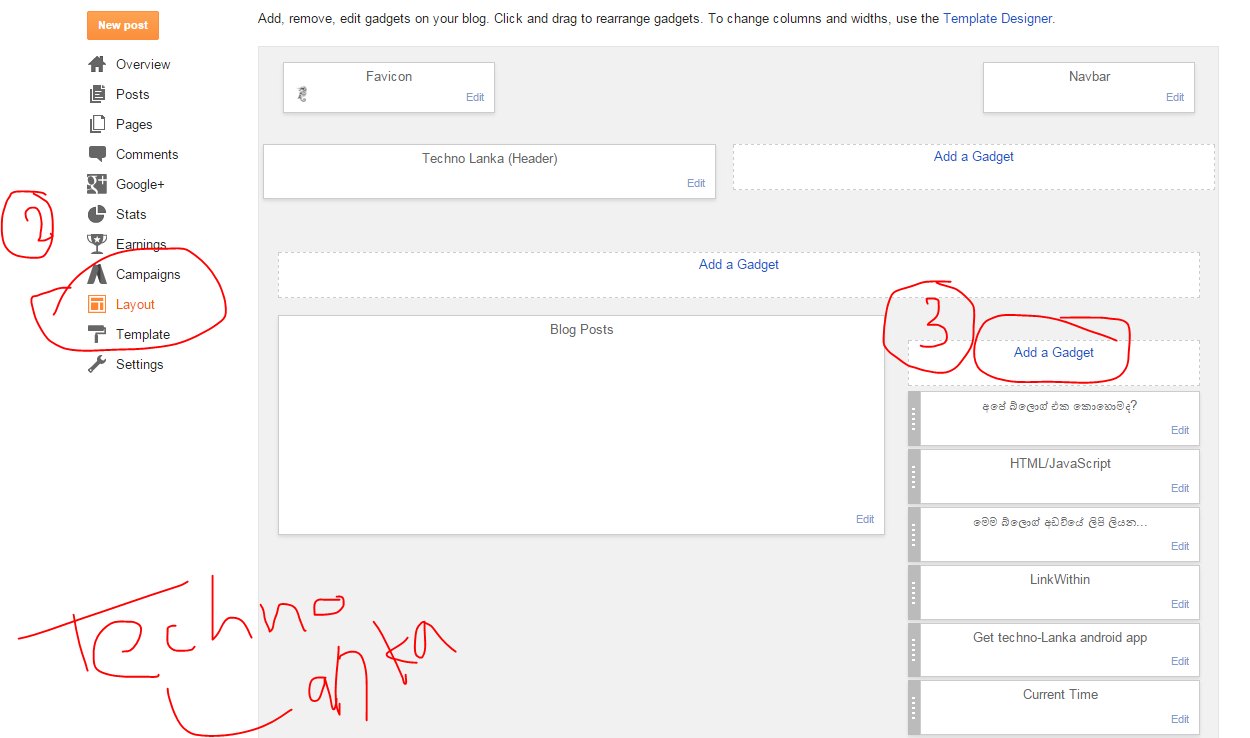
1-මුලින් ම blogger.com ගිහිල්ලා ඔයාට ගිනිකෙලි දාන්න ඕනේ බ්ලොග් එකේ Layout එකට යන්න
2-දැන් එතනින් Add a Gadget කියන එකට කිලික් කරන්න..
3-ඕපන් වෙන වින්ඩෝ එකේ තියෙන HTML/Java Script  කියන එකට යන්න.
4-ඒකේ title කියන තැනට කැමති නම්ක් දාලා පල්ලෙහා කෝඩ් එක Content කිය්න තැනට Paste කරන්න.
<script type="text/javascript"> // <![CDATA[ var bits=80; // how many bits var speed=33; // how fast - smaller is faster var bangs=5; // how many can be launched simultaneously (note that using too many can slow the script down) var colours=new Array("#03f", "#f03", "#0e0", "#93f", "#0cf", "#f93", "#f0c"); //                     blue    red     green   purple  cyan    orange  pink var bangheight=new Array(); var intensity=new Array(); var colour=new Array(); var Xpos=new Array(); var Ypos=new Array(); var dX=new Array(); var dY=new Array(); var stars=new Array(); var decay=new Array(); var swide=800; var shigh=600; var boddie; if (typeof('addRVLoadEvent')!='function') function addRVLoadEvent(funky) {   var oldonload=window.onload;   if (typeof(oldonload)!='function') window.onload=funky;   else window.onload=function() {     if (oldonload) oldonload();     funky();   } } addRVLoadEvent(light_blue_touchpaper); function light_blue_touchpaper() { if (document.getElementById) {   var i;   boddie=document.createElement("div");   boddie.style.position="fixed";   boddie.style.top="0px";   boddie.style.left="0px";   boddie.style.overflow="visible";   boddie.style.width="1px";   boddie.style.height="1px";   boddie.style.backgroundColor="transparent";   document.body.appendChild(boddie);   set_width();   for (i=0; i<bangs; i++) {     write_fire(i);     launch(i);     setInterval('stepthrough('+i+')', speed);   } }} function write_fire(N) {   var i, rlef, rdow;   stars[N+'r']=createDiv('|', 12);   boddie.appendChild(stars[N+'r']);   for (i=bits*N; i<bits+bits*N; i++) {     stars[i]=createDiv('*', 13);     boddie.appendChild(stars[i]);   } } function createDiv(char, size) {   var div=document.createElement("div");   div.style.font=size+"px monospace";   div.style.position="absolute";   div.style.backgroundColor="transparent";   div.appendChild(document.createTextNode(char));   return (div); } function launch(N) {   colour[N]=Math.floor(Math.random()*colours.length);   Xpos[N+"r"]=swide*0.5;   Ypos[N+"r"]=shigh-5;   bangheight[N]=Math.round((0.5+Math.random())*shigh*0.4);   dX[N+"r"]=(Math.random()-0.5)*swide/bangheight[N];   if (dX[N+"r"]>1.25) stars[N+"r"].firstChild.nodeValue="/";   else if (dX[N+"r"]<-1.25) stars[N+"r"].firstChild.nodeValue="\\";   else stars[N+"r"].firstChild.nodeValue="|";   stars[N+"r"].style.color=colours[colour[N]]; } function bang(N) {   var i, Z, A=0;   for (i=bits*N; i<bits+bits*N; i++) {     Z=stars[i].style;     Z.left=Xpos[i]+"px";     Z.top=Ypos[i]+"px";     if (decay[i]) decay[i]--;     else A++;     if (decay[i]==15) Z.fontSize="7px";     else if (decay[i]==7) Z.fontSize="2px";     else if (decay[i]==1) Z.visibility="hidden";     if (decay[i]>1 && Math.random()<.1) {        Z.visibility="hidden";        setTimeout('stars['+i+'].style.visibility="visible"', speed-1);     }     Xpos[i]+=dX[i];     Ypos[i]+=(dY[i]+=1.25/intensity[N]);   }   if (A!=bits) setTimeout("bang("+N+")", speed); } function stepthrough(N) {   var i, M, Z;   var oldx=Xpos[N+"r"];   var oldy=Ypos[N+"r"];   Xpos[N+"r"]+=dX[N+"r"];   Ypos[N+"r"]-=4;   if (Ypos[N+"r"]<bangheight[N]) {     M=Math.floor(Math.random()*3*colours.length);     intensity[N]=5+Math.random()*4;     for (i=N*bits; i<bits+bits*N; i++) {       Xpos[i]=Xpos[N+"r"];       Ypos[i]=Ypos[N+"r"];       dY[i]=(Math.random()-0.5)*intensity[N];       dX[i]=(Math.random()-0.5)*(intensity[N]-Math.abs(dY[i]))*1.25;       decay[i]=16+Math.floor(Math.random()*16);       Z=stars[i];       if (M<colours.length) Z.style.color=colours[i%2?colour[N]:M];       else if (M<2*colours.length) Z.style.color=colours[colour[N]];       else Z.style.color=colours[i%colours.length];       Z.style.fontSize="13px";       Z.style.visibility="visible";     }     bang(N);     launch(N);   }   stars[N+"r"].style.left=oldx+"px";   stars[N+"r"].style.top=oldy+"px"; } window.onresize=set_width; function set_width() {   var sw_min=999999;   var sh_min=999999;   if (document.documentElement && document.documentElement.clientWidth) {     if (document.documentElement.clientWidth>0) sw_min=document.documentElement.clientWidth;     if (document.documentElement.clientHeight>0) sh_min=document.documentElement.clientHeight;   }   if (typeof(self.innerWidth)!="undefined" && self.innerWidth) {     if (self.innerWidth>0 && self.innerWidth<sw_min) sw_min=self.innerWidth;     if (self.innerHeight>0 && self.innerHeight<sh_min) sh_min=self.innerHeight;   }   if (document.body.clientWidth) {     if (document.body.clientWidth>0 && document.body.clientWidth<sw_min) sw_min=document.body.clientWidth;     if (document.body.clientHeight>0 && document.body.clientHeight<sh_min) sh_min=document.body.clientHeight;   }   if (sw_min==999999 || sh_min==999999) {     sw_min=800;     sh_min=600;   }   swide=sw_min;   shigh=sh_min; } // ]]> </script><a href="http://www.bloggertrix.com/"></a>

5-දැන් Save බොත්තම ක්ලික් කරන්න.. ඔක්කොම හරි..


Thursday, April 9, 2015

අපි ලඟ තියෙන හැම software එකකටම product keys ,serials ගන්න හොදම sites මෙන්න


අපිට software එකක් free download කලාම තියෙන ලොකුම අවුල තමා ඒකෙ license එක දවස් 2ක 3න කින් expire වෙන එක.ඒකට හොඳම විසඳුම තමා මේ.ලෝකයේ තියෙන දහස් ගානක් software වලට අවශ්‍ය වන product keys , serials මේ sites  වල තියෙනව. අනික හැම  serials  ම වැඩ කරන්නෙත් නෑ නෙ. ඒවා software එකට අතුලත් කලාම සමහර වෙලාවට software එක වැඩ  නොකර යනව. එතකොට ඉතින් අමුතුවෙන් install කරන්නත් වෙන අවස්ථා එනවනෙ. තවත් විටෙක විනාඩි 2 , 3 කින් download කරන ඒ software එක activate කරගන්න නොදන්නා අය පැය ගනන් අමාරුවෙ වැටෙනව. මම මේ කියන sites වල තියෙන product keys , serials , activation keys කොච්චර දුරකට වැඩ කරනවඩ කියලත් ඔයාලටනිශ්චිතව දැනගන්නත් පුලුවන්. එහෙනම් ගිහින්ම බලන්න. 
මෙතනින්  හා  මෙතනින්   


comment එකකුත් දාන්න. මේ මම first time දාපු post එක.  

THANK YOU  !!!!!!!!!

Friday, March 27, 2015

පාවෙන ෆේස්බුක් ලයික් බොක්ස් එකක් බ්ලොග් එකට....


මෙන්න මෙහෙමයි කතාව.. මේ ලයික් බොක්ස් එක දාගත්තට පස්සේ ඒක අපේ බ්ලොග් එකේ දකුණු පැත්තේ පෙන්නනවා.. ඒක උඩට මවුස් එක ගෙනිච්චට පස්සේ ඒක මතු වෙනවා...

පල්ලෙහා කෝඩ් එක බ්ලොග් එකේ Layout එකෙන් ගිහින්-Add a Gadget ගිහින් Html/Java Script ගිහින් පේස්ට් කරන්න. ඒකේ තියෙන technolanka කියන එක  වෙනුවට ඔයාගේ ෆේස් බුක් පේජ් එකේ නම   පේස්ට් කරන්න. ෆේස්බුක් යූසර් නේම් එක හදාගන්න මෙහන ක්ලික් කරන්න.


<script type="text/javascript"> /*<![CDATA[*/ jQuery(document).ready(function() {jQuery(".theblogwidgets").hover(function() {jQuery(this).stop().animate({right: "0"}, "medium");}, function() {jQuery(this).stop().animate({right: "-250"}, "medium");}, 500);}); /*]]>*/ </script> <style type="text/css"> .theblogwidgets{background: url("https://blogger.googleusercontent.com/img/b/R29vZ2xl/AVvXsEhzKy2qdh95AdbHp8cE8ANV1Y20gYgiG9Bzj_7Pu7JhC4e43lSHAUQ86wUMUeZsMiBIQMS5FABTZAnpfiulrMQGWDdKPtUmgPmS4De6RgD4nQhRi-bh0xlyIbD4g3hzFYxOjxHOkPQVDp-V/") no-repeat scroll left center transparent !important; float: right;height: 270px;padding: 0 5px 0 46px;width: 245px;z-index:  99999;position:fixed;right:-250px;top:20%;} .theblogwidgets div{ padding: 0; margin-right:-8px; border:4px solid  #3b5998; background:#fafafa;} .theblogwidgets span{bottom: 4px;font: 8px "lucida grande",tahoma,verdana,arial,sans-serif;position: absolute;right: 6px;text-align: right;z-index: 99999;} .theblogwidgets span a{color: gray;text-decoration:none;} .theblogwidgets span a:hover{text-decoration:underline;} } </style><!--Brought to you by www.TheBlogWidgets.com--><div class="theblogwidgets" style="">
<!--Brought to you by http://www.theblogwidgets.com/2013/11/floating-facebook-like-box-widget-for.html--><div>
<!-- http://www.theblogwidgets.com/2013/11/floating-facebook-like-box-widget-for.html--> <iframe src="http://www.facebook.com/plugins/likebox.php?href=http%3A%2F%2Ffacebook.com%2Ftechnolanka&width=245&colorscheme=light&show_faces=true&border_color=white&connections=9&stream=false&header=false&height=270" scrolling="no" frameborder="0" scrolling="no" style="border: white; overflow: hidden; height: 270px; width: 245px;background:#fafafa;color:000;"><!--Brought to you by www.TheBlogWidgets.com--></iframe><!--Brought to you by www.TheBlogWidgets.com--><span><!--Brought to you by www.TheBlogWidgets.com--><center>
<a rel="nofollow" style="color:#a8a8a8;font-size:8px;" href="http://jasperroberts.com">Jasper Roberts Consulting</a> - <a style="color:#a8a8a8;font-size:8px;" href="http://www.theblogwidgets.com/2013/11/floating-facebook-like-box-widget-for.html">Widget</a></center>
</span></div>
</div>
ඒක ඇඩ් කරාට පස්සෙත් පේන්නේ නැත්නම් Design-Edit HTML ගිහිල්ලා Ctrl+F ඔබලා <Head> කියන එක හොයාගන්න. ඒකට යටින් පහළ කෝඩ් එක පේස්ට් කරන්න.

<script src='https://ajax.googleapis.com/ajax/libs/jquery/1.6.1/jquery.min.js' type='text/javascript'/>
ඔන්න එහෙනම් අදට යන්නම්.. ටටා.. 

Wednesday, March 25, 2015

ලොකෙ ලස්සනම photos එකම තැනින්

            අද  ඔයාලට කියන්න යන්නනෙ ලොකෙ ලොකුම photo එකතුවගැන .මේ web එකෙනම pixoto  .මම මෙක ගෙන වැඩිය විස්තර කරන්නෙනේ ඔයාලම ගිහින් බලන්න   මතනින් යන්න

මගෙ වෙනත් ලිපි >ඕන වෙබ් සයිට් එකකට හොරෙන් යන්න පුලුවන් ලොව ආරක්ෂිතම වෙබ් බ්‍රව්සරය මතනින්

Tuesday, March 24, 2015

Google search රහස්


අපි හැම‍‍ෝම Google search කරලා තිය‍‍නවන‍‍ේ අද මම Google search රහස් ටිකක් කියන්නම්.....

1.Google Calculator
අපිට ටිකක් අමාරු ග‍‍ානක් හමු වුන‍‍ොත් ම‍‍ෙ විදියට අපිට ඒක විසද ගන්න පුලුවන්. what is කියලා type කරලා අපිට අවශ්‍ය ග‍‍ාන දැම්මම අපිට උත්තර‍‍ේ එනව‍‍ා ex-what is  5+2+6+5(9-3) අපිට ඕන නම් ම‍‍ේක කැල් 1ක් විදියටත් ගන්න පුලුවන්


2.Google Dictionary
අපිට ම‍‍ොකක් හරි වචනයක ත‍‍ේරුම දැන ගන්න ඕන වුන‍ොත් define: කියලා type කරලා අවශ්‍ය වචන‍‍‍‍ෙ දැම්මම ඒක‍‍ෙ ත‍‍ේරුම එනවා. ex-define:mother


3.Google මාර්ග‍‍ොපද‍‍ේශක
අපි‍ට ක‍ොහ‍ොට හරි යන්න තියන දුර,කාලය වග‍ේ හැම ද‍‍ෙයක්ම ම‍ෙිකන් අපිට දැන ගන්න පුලුවන් කරන්න තිය‍ෙන්න‍‍ෙ යන්න ඕන to දාලා නගර 2ක type කරන 1කයි.ex- kalutara to colombo කියලා type කල‍ොත් ඒ ඔක්ක‍ොම විස්තර එයි.


4.Google unit convertor
අපිට ම‍ොකක් හරි unit 1ක් convert කරගන්න ඕන නම් ම‍ේක පාවිච්චි කරන්න පුලුවන් us dollar 1ක් රු කීයද,100m in inches වග‍ේ ඔන ද‍ෙයක්  convert කරන්න unit 2ක මැද්දට in/to දාලා search කරාම හරි ex-500 usd to lkr එ වග‍ේ ඕන දයෙක් දාලා
search කරන්න


5.සීමාවක් තුල search කිරීම
අපිට ම‍ොකක් හරි සීමාවක් තුල search කරන්න ඔින නම් ම‍ේක පාවිච්චි කරන්න පුලුවන් අපිට search කරන්න ඕන වචන අතර තිත්(.) ටිකක් තියලා පුලුවන්.ex-phones 5000....10000


ම‍ෙක ටිකක් අවුල් වග‍ේ නම් comment 1ක් දාලා කියන්න.